
Screenshots
MOD features
- Premium Unlocked.
Description
Screen & Manga Translator is a versatile Android translation tool built specifically for anyone who loves reading manga, manhwa, webtoons, playing untranslated mobile games, or browsing foreign apps. Created by COSMOMIME, this utility pairs advanced OCR text recognition with real-time on-screen translation, bulk image handling, and an integrated translation browser, eliminating the hassle of manually snapping screenshots and uploading them to separate translator tools.
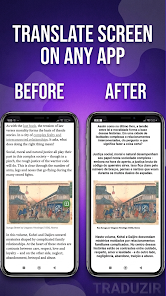
Real-time on-screen translation for comics and mobile games
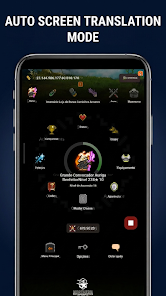
Thanks to its floating overlay bubble, Screen & Manga Translator lets you enjoy instant translations without ever minimizing your active app or game. A single tap grabs the full display and converts foreign text on the fly. Gamers and webtoon fans will love the Auto-Translate mode, which monitors display updates automatically to seamlessly render new dialogues and scrolling chapters. You can even toggle the translation service instantly straight from Android's Quick Settings tile.
This streamlined approach is a lifesaver whenever your favorite titles lack localization in your native language. Rather than endlessly snapping pictures, jumping into external translation software, and importing images back and forth, you can read everything seamlessly in-place right on your screen.
Tailored text recognition designed for comics and webtoons
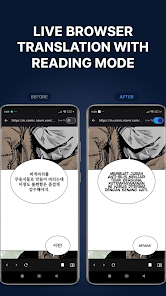
Standard translators often struggle with visual art, but Screen & Manga Translator is fine-tuned to conquer complex comic typography. It comes packed with dedicated image preprocessing presets tailored for traditional black-and-white manga, screentone patterns, and rich full-color digital manhwa. Powered by OpenCV Inpainting technology, the app cleanly erases foreign text and reconstructs the underlying artwork before overlaying the translated lines.
Keep dialogues neat and legible inside speech bubbles with adjustable fitting modes, including Shrink, Expand, and Strict. The engine accommodates both horizontal scripts and vertical typography, fully supporting traditional right-to-left manga pages as well as vertical-scrolling webtoon formats. Translated phrases fit naturally into the visual panels instead of appearing as awkward, disconnected text boxes.
Bulk image translation and full series export
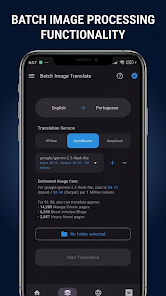
In addition to real-time display capturing, Screen & Manga Translator delivers robust batch processing across entire folders and multi-page chapters. The built-in Series Mode keeps your library structured by directory, keeps tabs on your translation progress, and processes whole chapters in bulk. When finished, you can export your fully localized releases into CBZ, PDF, or ZIP files ready for your favorite comic reader apps.
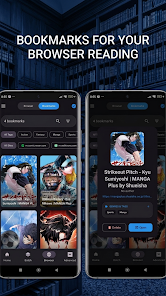
The app features an integrated in-app translation browser, allowing you to browse popular light novel and webcomic portals directly. You can bookmark preferred reading sources with Smart Bookmarks and read translated web chapters seamlessly without juggling different apps. If an OCR reading or automated translation misses the mark, you can easily edit the detected words and translated lines manually.
Tips and helpful guide for Screen & Manga Translator
When starting out with Screen & Manga Translator, we recommend testing the one-tap overlay on a simple page or game interface first to see how it captures fonts. For graphic novels and comics, always pick the image preprocessing mode matching your source material—traditional B&W manga and full-color webtoons require distinct background handling, and choosing the proper filter ensures sharper OCR and cleaner inpainting results.
For gamers and app users navigating fast-paced dialogue, turning on Auto-Translate cuts down on repetitive tapping. However, whenever scenes contain heavy visual animations or stylized fonts, a quick manual check helps verify line accuracy. When translating long-running series, taking advantage of Series Mode and bulk processing will save you immense time over converting single panels manually.
Conclusion
Screen & Manga Translator stands out as a dedicated on-screen translation solution for Android rather than just another generic dictionary tool. Loaded with features like real-time screen overlays, automated translation, bubble-fitting customization, bulk processing, PDF/CBZ/ZIP exporting, and a built-in web translator, it is an essential companion for manga enthusiasts, webtoon readers, gamers, and language learners alike. Whether you are playing non-localized foreign games or translating entire volumes of comics in bulk, this app delivers the power, flexibility, and convenience you need on ApkUnlimit.
How to install
- Download the APK file above to your phone.
- Allow “Install unknown apps” when prompted.
- Open the downloaded APK and tap Install.
- If the package includes OBB/XAPK data, follow the bundled instructions.
MOD APKs are modified builds, so Play Protect may show a warning. Install only if you trust the file; use at your own risk.