

Screenshots


MOD features
- Premium Unlocked.
Description
Komx is a versatile comic and manga reader for Android designed to seamlessly handle offline archives while leveraging powerful on-device AI capabilities. It natively opens popular formats like CBZ and ZIP archives alongside standard image folders loaded with JPEG, PNG, or WEBP panels. More than just a traditional comic viewer, Komx brings next-level utilities directly to your device, letting you colorize monochrome manga pages, extract text via OCR, and translate speech bubbles in real time.
Enjoy a seamless comic and manga reading experience on Android
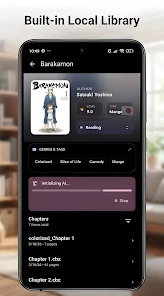
A major highlight of Komx is its integrated local library manager, letting you organize and enjoy your collection right from your smartphone storage. You can instantly launch CBZ and ZIP archives or browse raw image directories without worrying about file conversions. This makes it an outstanding choice for manga enthusiasts seeking a smooth, professional offline reader for their personal archives.
To keep your library tidy, the app provides smart organization tools such as custom shelving categories, universal tags, and a handy Folder Merge option. These features ensure that even if your graphic novels and manga chapters are scattered across separate directories, you can quickly locate any title and jump straight back into reading.
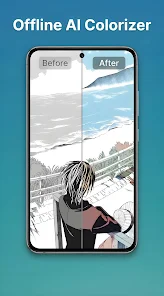
Transform monochrome manga with smart on-device AI colorization
Among the most impressive features in Komx is its built-in AI Colorization engine. Driven by optimized ONNX and TensorFlow models, the application automatically infuses vibrant colors into classic black-and-white comic pages. Best of all, all visual processing happens locally on your device hardware, eliminating the need to upload your pages to remote cloud servers.
This offline architecture provides total privacy and peace of mind for users reluctant to share their comic collections with external servers. Keep in mind that neural rendering can be computationally demanding—especially when processing multi-page batches—so rendering speeds will naturally reflect your Android device's processing power.
Built-in OCR recognition, instant translation, and online Web Reader
Beyond standard viewing and color enhancement, Komx incorporates Google ML Kit-powered OCR to accurately scan text directly within manga panels. Once detected, the built-in translation module translates foreign dialogue into your preferred language on the fly. This makes it an indispensable tool for manga fans reading raw imports and foreign comic releases without official translations.
With its integrated Web Reader, Komx also lets you discover and stream online webcomics without ever exiting the app. Bringing offline cataloging and built-in web browsing into one unified interface means you can effortlessly manage your downloaded titles while exploring fresh digital sources in one place.
How to use Komx: Helpful tips and beginner's guide
To get started with Komx, simply grant storage permissions via Android's Storage Access Framework (SAF) and point the app to your comics directory. If your manga files are packaged in ZIP or CBZ formats, they will open immediately without unpacking. For sprawling collections, taking advantage of custom tags and categories will make navigating your library effortless.
When experimenting with AI Colorization, it is best to test single pages or brief chapters before batch-processing entire manga volumes. Checking sample output first lets you fine-tune your workflow to match your hardware's limits. Similarly, reserve on-the-fly OCR and translation for unreadable text passages to conserve battery and system memory during long reading sessions.
Final Verdict
Komx elevates the mobile reading experience far beyond a simple comic viewer by combining smart library indexing, an integrated Web Reader, text recognition, page translation, and offline AI colorization. Thanks to robust support for CBZ, ZIP, and standard picture folders, it stands out as an exceptionally versatile reader for offline manga collections on Android.
If you want an all-in-one reader that pairs a clean reading interface with cutting-edge on-device AI processing, Komx is definitely worth checking out on ApkUnlimit. Its dedicated offline processing ensures both data privacy and complete convenience for managing your entire graphic novel library.
How to install
- Download the APK file above to your phone.
- Allow “Install unknown apps” when prompted.
- Open the downloaded APK and tap Install.
- If the package includes OBB/XAPK data, follow the bundled instructions.
MOD APKs are modified builds, so Play Protect may show a warning. Install only if you trust the file; use at your own risk.