

Screenshots
MOD features
- Premium Unlocked
- No Ads
Description
Whether you are a digital creator, vlogger, or everyday mobile videographer who wants to film life from every perspective, capturing your environment and your genuine facial reactions at the exact same moment is a game changer. Dual Camera & PiP – DualView was developed as an advanced multi-angle recording solution optimized specifically for Android devices.
Overview of Dual Camera & PiP – DualView
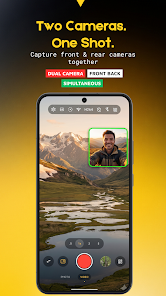
Instead of constantly flipping back and forth between front and back lenses and breaking your natural flow, this handy utility lets you shoot with both cameras simultaneously. It stands out as a premium dual camera video recording app, combining a sleek modern interface, highly customizable Picture-in-Picture (PiP) framing, and manual studio-grade controls.
Simultaneous Dual-Lens Recording with Versatile Layouts
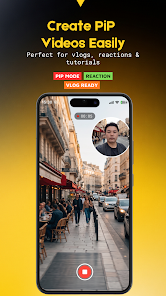
The signature strength of DualView lies in its power to record from two cameras at once virtually latency-free. Content creators can pick from a variety of practical framing styles, including vertical splits, side-by-side splits, and floating Picture-in-Picture setups. The PiP window can easily be moved, zoomed, and adjusted on the fly between circular and rectangular formats, delivering a truly dynamic multi-angle vlog experience ideal for reaction videos, personal interviews, and travel logs.
Manual Camera Controls and Leveling Features
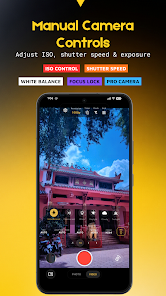
Beyond straightforward automatic filming, the app provides a robust suite of manual camera adjustments. Depending on your phone's hardware capabilities, you can take control of ISO, shutter speed, white balance, exposure compensation (EV), autofocus lock (AF Lock), and auto-exposure lock (AE Lock). To top it off, an onscreen compass and horizontal leveling indicator ensure your angles remain sharp and aligned when shooting architecture or scenic vistas.
Helpful Tips & User Guide for Dual Camera & PiP – DualView
Verify Hardware Compatibility and Choose the Right Layout
To guarantee peak performance and silky-smooth clips, take a moment to explore the Dual Camera DualView usage guide while testing your smartphone. Because synchronized dual-camera recording relies on Camera2 API compatibility, test-record a few brief clips beforehand to ensure your phone stays cool and responsive. For product reviews and unboxings, go with a compact PiP window placed near the top so you never obscure key details in the primary frame.
Lock Exposure and Take Advantage of Grid Lines
When shooting outdoors in shifting lighting conditions, turn on AE/AF Lock to prevent annoying brightness jumps and focus hunting. In addition, activate the grid overlays and digital horizon leveler to compose your scenes using the classic rule of thirds, immediately giving your video a more refined, cinematic look.
Final Verdict
Dual Camera & PiP – DualView is a complete, versatile photography and dual-video toolkit that unlocks the full creative potential of your Android device. With its seamless dual-sensor capture, adaptable PiP modes, and granular manual controls, this tool is a must-have for vloggers and social media creators alike. Download it from ApkUnlimit today to capture both sides of every unforgettable moment.
How to install
- Download the APK file above to your phone.
- Allow “Install unknown apps” when prompted.
- Open the downloaded APK and tap Install.
- If the package includes OBB/XAPK data, follow the bundled instructions.
MOD APKs are modified builds, so Play Protect may show a warning. Install only if you trust the file; use at your own risk.