
Screenshots
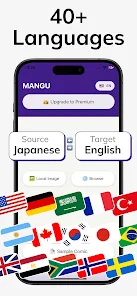

MOD features
- Premium Unlocked
Description
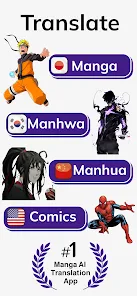
Manga Translator AI is a handy Android utility created to translate manga, manhwa, and comic pages directly from images. Instead of painstakingly retyping dialogue into third-party tools, readers can simply upload panels with text to extract speech bubbles and render them in their native tongue. It stands as an ideal companion for fans of raw Japanese, Korean, Chinese, and international comic releases.
Manga Translator AI Overview
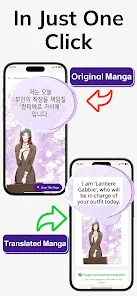
What makes Manga Translator AI stand out is its smooth pairing of on-device OCR (optical character recognition) with automated machine translation. When encountering pages filled with dialogue boxes, simply load the image into the app—the engine instantly scans text zones, extracts the phrasing, and serves up a clear translation.
This smart workflow saves considerable time over manual translation methods. Particularly for fast-paced pages with numerous short captions, translating directly on the page delivers unmatched convenience. Users can select both source and target languages prior to scanning, depending on supported language packs.
Direct On-Image Comic Translation
Getting started with Manga Translator AI is straightforward: select any raw comic scan or screenshot stored on your device. The scanning engine detects dialogue zones before seamlessly transforming them into your target language.
The power to extract dialogue straight from pictures is indispensable when catching up on untranslated manga chapters. Detection accuracy may naturally vary according to graphic resolution, font style, and overall panel complexity. Sharp, high-contrast images with straight text lines provide the cleanest results.
Tips to Get the Best Results from Manga Translator AI
For the highest translation quality in Manga Translator AI, always use crisp, high-definition scans. If a panel features complex visual effects, ornate calligraphy, or cluttered backgrounds, crop the target speech bubble or try a cleaner scan.
Setting the right source language is essential. Whether reading raw Japanese manga, Korean manhwa, or Chinese manhua, choosing the exact original language prevents OCR identification errors. Always double-check important dialogue, as machine translation can sometimes overlook slang, idioms, or nuanced story context.
Furthermore, check storage and gallery permissions when translating batches of comic files. To safeguard your privacy, never import images with private or personal details unless you are familiar with how your files are processed.
Final Thoughts
Manga Translator AI provides a seamless way to enjoy foreign comics by uniting modern OCR with AI translation. It empowers comic enthusiasts to read untranslated releases effortlessly without tedious manual transcription. To enjoy optimal results, rely on clear images, set the appropriate languages, and keep story context in mind.
How to install
- Download the APK file above to your phone.
- Allow “Install unknown apps” when prompted.
- Open the downloaded APK and tap Install.
- If the package includes OBB/XAPK data, follow the bundled instructions.
MOD APKs are modified builds, so Play Protect may show a warning. Install only if you trust the file; use at your own risk.